


In this short guide, we will learn how to add custom file types to the right-click context menu in Linux Mint using the Nemo file manager. Whether you're a developer, system administrator, or power user, creating custom file templates streamlines your workflow by allowing instant creation of Python scripts, configuration files, markdown documents, and more directly from the context menu.
The Nemo Templates folder (~/Templates) is the key to adding new file types to the "Create Document" submenu in Linux Mint's right-click context menu.
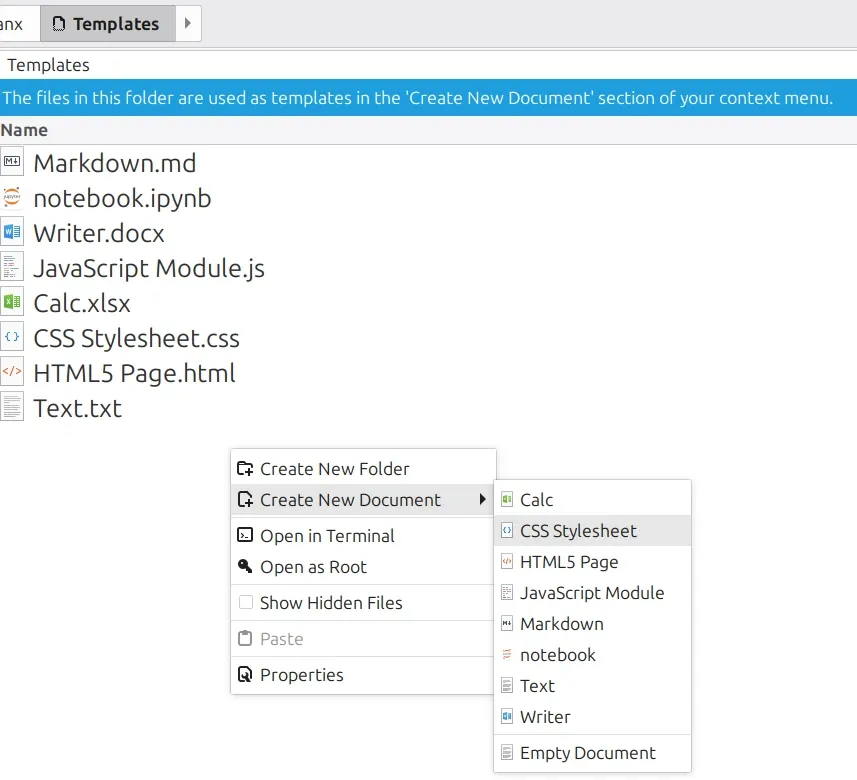
Here is the end result:
1. Understanding the Templates Folder
Linux Mint's Nemo file manager automatically detects files in the ~/Templates directory and adds them to the right-click context menu under "Create Document".
mkdir -p ~/Templates
cd ~/Templates
ls -la
Output Result:
total 44
drwxr-xr-x   2 user user  4096 Dec 10 00:57 .
drwxr-xr-x 125 user user 12288 Feb 15 10:35 ..
-rw-rw-r--   1 user user  6029 Apr 27  2025 Calc.xlsx
-rw-rw-r--   1 user user     1 Apr 27  2025 Markdown.md
-rw-rw-r--   1 user user     1 Apr 27  2025 notebook.ipynb
-rw-rw-r--   1 user user     1 Apr 27  2025 Text.txt
-rw-rw-r--   1 user user  4961 Apr 27  2025 Writer.docx
How it works: Any file placed in ~/Templates appears in the context menu. The filename becomes the menu label, making it essential to use descriptive names.
2. Simple solution with UI
Copy paste any file that you would like to use as a future template in folder: ~/Templates. When you right click the menu Nemo would copy and paste the template in the new folder(where the click was performed).
3. Creating Python Script Templates
Create Python script templates with shebang lines and basic structure for quick script creation.
cat > ~/Templates/"Python Script.py" << 'EOF'
#!/usr/bin/env python3
# -*- coding: utf-8 -*-

def main():
    print("Hello, World!")

if __name__ == "__main__":
    main()
EOF

chmod +x ~/Templates/"Python Script.py"
Output Result:
Template created: Python Script.py
Real-world use: Right-click in any folder → Create Document → Python Script.py instantly creates an executable Python file with proper structure.
4. Adding Multiple File Type Templates
Create templates for common development files like Bash scripts, Markdown docs, and JSON configs.
cat > ~/Templates/"Bash Script.sh" << 'EOF'
#!/bin/bash
set -euo pipefail

echo "Script started"
EOF

cat > ~/Templates/"Markdown Document.md" << 'EOF'
# Title

## Section 1

Content here...
EOF

cat > ~/Templates/"JSON Config.json" << 'EOF'
{
  "name": "example",
  "version": "1.0.0",
  "settings": {}
}
EOF

chmod +x ~/Templates/"Bash Script.sh"
Output Result:
Created: Bash Script.sh
Created: Markdown Document.md
Created: JSON Config.json
5. Creating Templates with Python Automation
Automate template creation using Python for dynamic content or bulk template generation.
import os
from pathlib import Path

templates_dir = Path.home() / "Templates"
templates_dir.mkdir(exist_ok=True)

templates = {
    "HTML5 Page.html": '<!DOCTYPE html>\n<html>\n<head>\n    <title>Page</title>\n</head>\n<body>\n    <h1>Content</h1>\n</body>\n</html>',
    "CSS Stylesheet.css": '* {\n    margin: 0;\n    padding: 0;\n    box-sizing: border-box;\n}',
    "JavaScript Module.js": 'export default class Module {\n    constructor() {\n        console.log("Initialized");\n    }\n}'
}

for filename, content in templates.items():
    (templates_dir / filename).write_text(content)
    print(f"Created: {filename}")
Output Result:
Created: HTML5 Page.html
Created: CSS Stylesheet.css
Created: JavaScript Module.js
6. Custom Icons for Templates (Advanced)
Add custom icons to templates by creating a desktop file in ~/.local/share/applications/.
cat > ~/.local/share/applications/python-template.desktop << 'EOF'
[Desktop Entry]
Type=Application
Name=Python Script Template
Icon=text-x-python
Exec=nemo-new-document ~/Templates/"Python Script.py"
Categories=Development;
EOF

update-desktop-database ~/.local/share/applications/
Output Result:
Desktop entry created with Python icon
Note: This method provides visual differentiation in the context menu for different file types.
7. Organizing Templates with Subfolders
Create organized template categories using Python to manage template hierarchies.
from pathlib import Path

templates_base = Path.home() / "Templates"
categories = {
    "Web Development": ["index.html", "style.css", "script.js"],
    "Python Projects": ["main.py", "test.py", "requirements.txt"],
    "Documentation": ["README.md", "CHANGELOG.md", "LICENSE"]
}

for category, files in categories.items():
    category_path = templates_base / category
    category_path.mkdir(exist_ok=True)

    for filename in files:
        (category_path / filename).touch()

    print(f"Created {len(files)} templates in {category}")
Output Result:
Created 3 templates in Web Development
Created 3 templates in Python Projects
Created 3 templates in Documentation
Limitation: Nemo doesn't show subfolders in the context menu by default. Consider using descriptive prefixes instead (e.g., "Web - HTML Page.html").
Common Use Cases
Software Development: Quick creation of script files, config files, README templates
System Administration: Generate cron job templates, systemd service files, log parsers
Content Creation: Instant blog post templates, project proposals, meeting notes
Data Science: Create Jupyter notebook stubs, CSV templates, data analysis scripts
Quick Reference Table
| Template Type | Location | Executable |
|---|---|---|
| Python Scripts | ~/Templates/Script.py |
Yes (chmod +x) |
| Bash Scripts | ~/Templates/Script.sh |
Yes (chmod +x) |
| Text Files | ~/Templates/Document.txt |
No |
| Config Files | ~/Templates/Config.json |
No |
FAQ
How do I add to the context menu in Linux Mint?
Place files in the ~/Templates directory. Nemo automatically adds them to Create Document submenu.
How do I add things to the context menu?
Create template files with descriptive names in ~/Templates. Use Python automation for bulk creation.
How do I add a new file type in Right click?
Create a template file with the desired extension in ~/Templates. The filename becomes the menu label.
How to create a new file in Linux Mint?
Right-click in any folder → Create Document → Select your template. The template is copied with a default name.