


This is short step by step guide for choosing laptop for Data Science and Linux. The article is based on my search for new laptop. My needs are:
- OS - Linux Mint or Linux
- 32+ RAM
- good CPU
- GPU - optional (I have desktop machine with OK GPU)
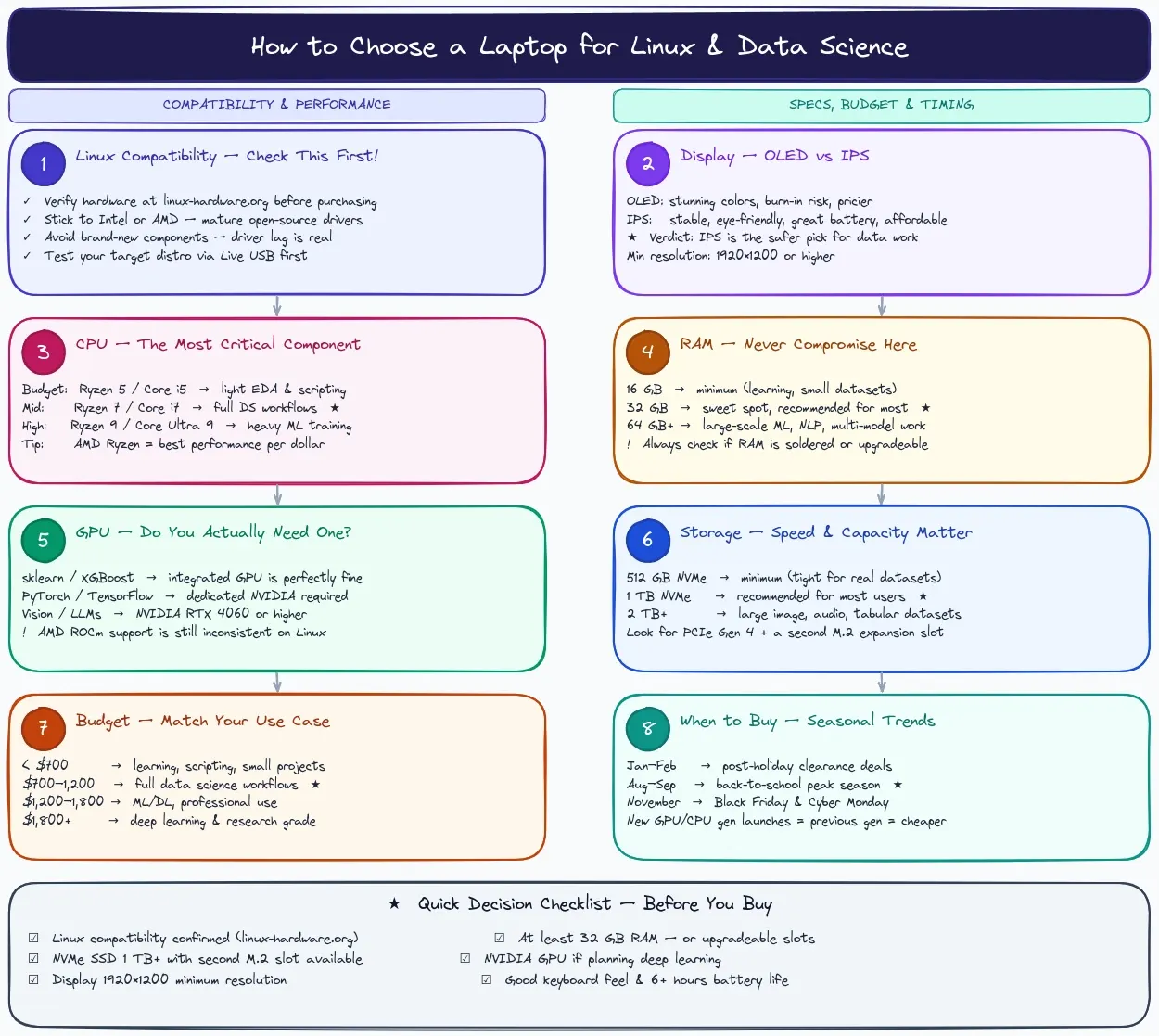
Step 1: Check Linux Compatibility First
Before anything else, verify the hardware has good Linux driver support. Stick to laptops with Intel or AMD CPUs/GPUs as they have mature open-source drivers. Check linux-hardware.org or the distro's hardware compatibility list before buying. Avoid niche or very new hardware where drivers may lag behind.
Step 2: Choose Your Display
| OLED | IPS | |
|---|---|---|
| Color accuracy | Exceptional (great for visualization work) | Good |
| Battery life | Better with dark themes | More consistent |
| Burn-in risk | Yes (avoid static UIs long-term) | None |
| Price | Higher | More affordable |
| Eye strain | Can be harsh at low brightness | Generally comfortable |
Verdict: For data science, IPS is the safer, more practical choice. Go OLED only if color accuracy and display quality are a priority and you're willing to pay the premium.
Step 3: Pick the Right CPU
The CPU is your most critical component for data science workloads like model training, data wrangling, and running Jupyter notebooks.
| Tier | Recommended CPUs | Use Case |
|---|---|---|
| Budget | AMD Ryzen 5 7530U / Intel Core i5-1335U | Light EDA, learning, scripting |
| Mid-range | AMD Ryzen 7 7745HX / Intel Core i7-13700H | Full data science workflows |
| High-end | AMD Ryzen 9 / Intel Core Ultra 9 | Heavy ML training, large datasets |
Tips: Prioritize core count and clock speed. AMD Ryzen generally offers better performance per dollar. Avoid older Intel U-series chips for serious workloads.
Step 4: RAM — Don't Compromise Here
RAM is non-negotiable for data science. Loading large DataFrames, running multiple notebooks, and multitasking all eat memory fast.
- 16 GB — Bare minimum; fine for learning and small datasets
- 32 GB — Sweet spot for most data science work
- 64 GB+ — Necessary for large-scale ML, NLP, or multi-model training
Always check if RAM is upgradeable before buying. Many thin laptops now solder RAM to the motherboard, locking you in forever.
Step 5: GPU — Do You Need One?
| Scenario | GPU Recommendation |
|---|---|
| Classical ML (scikit-learn, XGBoost) | Integrated GPU is fine |
| Deep learning (PyTorch, TensorFlow) | Dedicated NVIDIA GPU required |
| Computer vision / LLM fine-tuning | NVIDIA RTX 4060 or higher |
Linux GPU note: Stick to NVIDIA for CUDA support (essential for deep learning frameworks). AMD GPUs work on Linux but ROCm support is still inconsistent. Avoid Apple Silicon — CUDA doesn't run on it at all.
Step 6: Storage
- 512 GB NVMe SSD — Minimum; tight for datasets and virtual environments
- 1 TB NVMe SSD — Recommended for most users
- 2 TB+ — Ideal if you work with large image, audio, or tabular datasets locally
Look for PCIe Gen 4 drives for fast read/write speeds. Check if the laptop has a second M.2 slot so you can expand later. Avoid eMMC storage entirely — it's too slow for data science workflows.
Step 7: Match Budget to Use Case
| Budget | What You Get | Best For |
|---|---|---|
| Under $700 | Ryzen 5, 16 GB RAM, 512 GB SSD, no dGPU | Learning, small projects, scripting |
| $700–$1,200 | Ryzen 7 / i7, 32 GB RAM, 1 TB SSD, optional dGPU | Full data science workflows |
| $1,200–$1,800 | Ryzen 9 / i9, 32–64 GB RAM, RTX 4060, 1–2 TB SSD | ML/DL, professional use |
| $1,800+ | Top-tier CPU, RTX 4070/4080, 64 GB+ RAM | Deep learning, research, production |
Step 8: Time Your Purchase — Seasonal Trends
Laptop prices follow predictable cycles. Buying at the right time can save you 10–30%.
- January–February — Post-holiday clearance sales; great for previous-gen deals
- May–June — Back-to-school deals start early; student discounts kick in
- August–September — Peak back-to-school season; widest selection and discounts
- November — Black Friday and Cyber Monday; best time for high-end deals
- New product launches — When a new GPU or CPU generation drops, previous-gen prices fall sharply (watch for Intel/AMD/NVIDIA launch cycles)
Quick Decision Checklist
Before buying, confirm these boxes are checked:
- Linux compatibility verified for your target distro
- At least 32 GB RAM (or upgradeable)
- NVMe SSD with room to expand
- NVIDIA GPU if you plan to do deep learning
- Display resolution of at least 1920×1200 or higher
- Good keyboard and battery life for long work sessions