


How to Connect Claude Code to My Obsidian Vault: The Complete Guide
Why Connect Claude Code to Obsidian?
Claude Code is Anthropic's command-line AI coding assistant, and Obsidian is a local-first knowledge management app that stores your notes as plain Markdown files. Connecting them creates a powerful second brain system where Claude Code can read, write, and search your notes directly from your terminal.
The core advantage: Obsidian vaults are just folders of Markdown files, so Claude Code can read and write them natively with zero conversion overhead. Unlike Notion, which stores everything in a proprietary database requiring MCP to bridge the gap, Obsidian's file-based approach means Claude Code can operate on your notes directly.
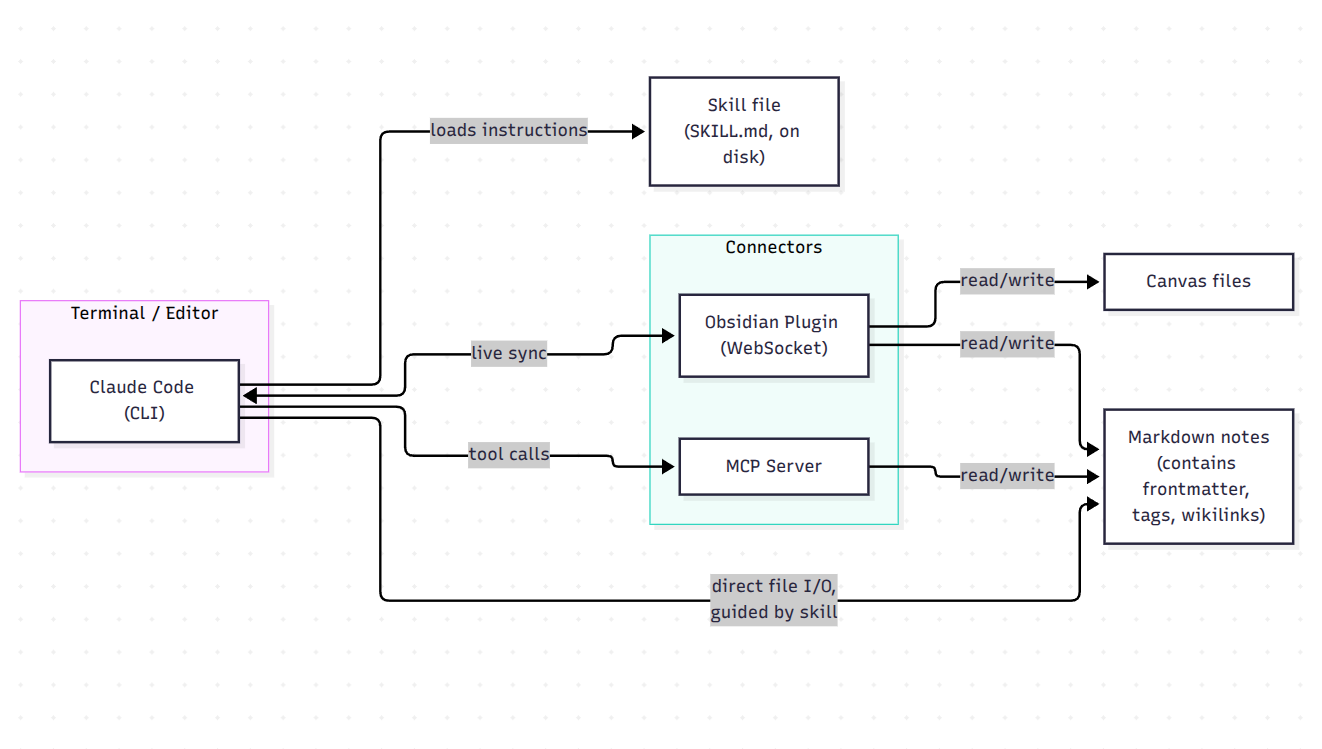
This guide covers three connection methods: MCP servers, Obsidian plugins, and Claude Code skills. Each serves different use cases, and you can combine them for a complete workflow.
Method 1: MCP Server (Recommended for Most Users)
MCP (Model Context Protocol) is the most flexible way to connect Claude Code to Obsidian. An MCP server exposes your vault to Claude Code as a structured API, allowing it to read notes, search content, create files, and edit existing ones—all locally on your machine.
Option A: Filesystem-Based MCP (Simplest Setup)
Filesystem servers read and write Markdown files directly. Obsidian doesn't need to be running, and setup is minimal—you just point the server at your vault directory.
Setup with @istrejo/obsidian-mcp:
claude mcp add obsidian -e OBSIDIAN_VAULT_PATH=/absolute/path/to/your/vault -- npx -y @istrejo/obsidian-mcp
Or manually edit ~/.claude/mcp.json:
{
  "mcpServers": {
    "obsidian": {
      "command": "npx",
      "args": ["-y", "@istrejo/obsidian-mcp"],
      "env": {
        "OBSIDIAN_VAULT_PATH": "/absolute/path/to/your/vault"
      }
    }
  }
}
This server provides 13 tools for reading, writing, searching, and organizing notes, including read_note, search_content, search_by_tags, create_note, and update_note. Security features include path traversal prevention, read-only mode, and automatic backups before deletion.
Setup with @freewilling/obsidian-mcp (encrypted option):
Add to ~/.claude/settings.json:
{
  "mcpServers": {
    "obsidian": {
      "command": "npx",
      "args": ["-y", "@freewilling/obsidian-mcp", "--vault", "~/Documents/MyVault"]
    }
  }
}
This server supports both local vault folders and remote CouchDB/LiveSync with end-to-end encryption. It includes tools for list_notes, read_note, write_note, append_note, search_notes, and get_action_items (which extracts TODOs and checkboxes).
Option B: REST API-Based MCP (Obsidian Must Be Running)
REST API servers connect through the Obsidian Local REST API plugin. The upside: Obsidian mediates all file operations, so the server can't bypass Obsidian's file handling.
Setup:
- In Obsidian, go to Settings → Community Plugins → Browse, search for "Local REST API", and enable it
- Note the API key from the plugin settings
- Configure Claude Code:
{
  "mcpServers": {
    "obsidian": {
      "url": "https://127.0.0.1:27124",
      "headers": {
        "Authorization": "Bearer your-obsidian-api-key"
      }
    }
  }
}
Option C: EON (Advanced Memory System)
EON is a locally-running development assistant that bridges Obsidian with Claude Code through MCP, offering 25 brain tools including semantic memory, knowledge graphs, and episodic memory.
Setup:
# Install globally (requires Bun)
bun install -g @demgun/eon

# Interactive setup
eon setup

# Register with Claude Code
claude mcp add eon -s user -- bunx @demgun/eon@latest
EON maintains project memory across sessions, learns from past decisions using ChromaDB + SQLite, and runs completely locally with zero cloud dependencies.
Method 2: Obsidian Plugins (Best for In-Editor Workflows)
NordCoderd/obsidian-claude-integration (Minimalist)
This plugin connects Claude Code to your notes with a focus on in-editor editing:
- Edit text with Claude — select text, type an instruction in the inline prompt bar, and Claude rewrites it in place
- Context menu actions — right-click selected text for one-click actions like Fix Grammar or Improve Writing
- Connect Obsidian as an IDE — when Claude Code runs in your terminal, it connects via local WebSocket and can read open files, selections, and save changes directly to your vault
Installation:
npm install
npm run build
Create a .env file with DEPLOY_DEST=/path/to/your/vault/.obsidian/plugins/obsidian-claude-integration, then run npm run deploy.
Copilot for Obsidian (Run Claude Code Inside Obsidian)
Copilot v4.0.0 runs Claude Code, Codex, and opencode natively inside Obsidian. Agents plan, search your vault by meaning, use tools, and write results back to your notes in fluent Obsidian syntax (wikilinks, canvases, Markdown).
Key features:
- Tabs — open a different agent in each tab and work multiple threads
- Project Mode — give an agent a scoped project with a per-project
AGENTS.md - Multi-agent collaboration — mention @claude @codex @opencode in one prompt and each agent works in parallel
Copilot is free and open source; you bring your own Claude subscription or API key. Miyo (local semantic search) is free for everyone, and your index stays on your machine.
claude-code-obsidian (Session Sync)
This plugin mirrors every Claude Code session into your vault as Markdown notes. Install via BRAT (Beta Reviewers Auto-update Tool), then enable "Claude Code Sync" in Community Plugins settings.
Method 3: Claude Code Skills (Best for Structured Workflows)
Skills are reusable instruction sets that teach Claude Code how to perform specific tasks in your vault.
Clausidian
Clausidian is a comprehensive toolkit with zero dependencies that installs a /obsidian skill and registers 44+ MCP tools:
npm install -g clausidian
clausidian init ~/my-vault
clausidian setup ~/my-vault
This installs the /obsidian skill to ~/.claude/skills/obsidian/ and registers the MCP server in ~/.claude/.mcp.json. After restart, use /obsidian in Claude Code sessions to manage your vault.
Available commands include:
clausidian journal— create today's journalclausidian note "Build API" project --tags "backend,api"— create a project noteclausidian search "API" --type resource— search notesclausidian review— generate weekly reviewclausidian graph— generate Mermaid knowledge graph
Second Brain Skill
This skill turns Claude into a note-taking co-pilot that auto-logs research, decisions, project progress, meetings, and daily notes into your vault. It writes structured Markdown into your vault with daily notes at Daily/YYYY-MM-DD.md.
Building an AI Second Brain
For a complete second-brain system, the recommended approach involves:
- Setting up Obsidian as your knowledge vault with numbered folder structure
- Connecting Claude Code via MCP
- Creating a
CLAUDE.mdfile at the vault root that tells Claude Code how to behave inside the vault - Using skills for structured workflows like daily briefs and research logging
Obsidian as Memory for Claude Code
One of the most powerful applications is using your vault as persistent memory for Claude Code, solving the problem that context dies with each session.
mcp-phantom-brain
This MCP server gives Claude structured, validated long-term memory backed by an Obsidian vault. Unlike simple note-taking, it validates claims before committing them—the host LLM evaluates each incoming claim for logical fallacies, source quality, and contradictions with existing knowledge.
Memory storage is a two-phase protocol:
brain_remember— runs server-side checks and returns an evaluation packagebrain_commit— the host LLM commits its verdict (store, reject, or ask)
Setup:
{
  "phantom-brain": {
    "command": "node",
    "args": ["/path/to/mcp-phantom-brain/dist/index.js"],
    "env": {
      "BRAIN_VAULT_PATH": "/path/to/your/vault"
    }
  }
}
claude-camp / obsidian-second-brain
These tools create a persistent knowledge base for Claude Code that maintains a structured wiki across sessions using Obsidian as the viewer. The pipeline gives your AI coding sessions long-term memory—an Obsidian vault that becomes a curated, agent-maintained wiki.
second-brain Claude Skill
A Claude skill that turns an Obsidian vault into durable, token-efficient external memory so context survives /compact, long sessions, and new chats. Every note is written twice: a rich human version and an ultra-condensed AI version with zero information loss.
Frequently Asked Questions
What is Obsidian AI?
Obsidian AI refers to the ecosystem of AI-powered features and integrations available for Obsidian. Interestingly, Obsidian itself deliberately has no built-in AI features—and that's exactly why it works so well with AI tools. As one analysis notes, "Obsidian still has no AI features—and that makes it the best AI notes app." The lack of built-in AI means the app stays fast, local, and focused on being an excellent Markdown editor, while community plugins like Copilot, Smart Connections, and Text Generator add chat, semantic search, and model access on top.
The most powerful "Obsidian AI" setup is connecting external AI agents like Claude Code via MCP. When MCP is connected, AI automatically references documents, follows backlinks to related notes, grasps context, and generates code accordingly.
How to use Obsidian as memory for Claude?
There are several approaches, from simple to sophisticated:
Simple approach: Connect an MCP server (like @istrejo/obsidian-mcp or EON) and instruct Claude Code to write important decisions, context, and project state into your vault. On the next session, it reads them back.
Structured approach: Use a dedicated memory MCP server like mcp-phantom-brain, which implements a two-phase validation protocol where claims are checked for logical fallacies and contradictions before being stored.
Skill-based approach: Install a Claude Code skill like second-brain that automatically logs research, decisions, and project progress into structured daily notes at Daily/YYYY-MM-DD.md.
Advanced approach: Use claude-camp or obsidian-second-brain, which maintain a structured wiki across sessions with slash commands as the interface.
The key insight: Obsidian's Markdown files are both human-readable and ideal for LLM consumption. Every note is written twice in some systems—a rich human version and an ultra-condensed AI version.
Can I get Obsidian for free?
Yes. Obsidian is free for all purposes, including personal, commercial, and non-profit use. You can download and use Obsidian without creating an account, and your data is saved locally on your device and never sent to their servers.
Optional paid offerings exist:
- Catalyst license — one-time $25 fee for early access to beta versions
- Commercial license — optional annual license to support development
- Obsidian Sync — $5/month for encrypted cross-device sync
- Obsidian Publish — $10/month for publishing notes as a website
All core features are available free without limits. Students and teachers get a 40% discount on Sync and Publish.
What are the key differences between Claude Code Notion and Obsidian?
| Aspect | Obsidian + Claude Code | Notion + Claude Code |
|---|---|---|
| File format | Plain Markdown files | Proprietary database |
| Setup | Zero setup — Claude reads files directly | Requires MCP bridge (15 min setup) |
| Data location | Fully local on your machine | Cloud-based |
| AI compatibility | Markdown is ideal for LLMs | Requires API/MCP mediation |
| Collaboration | Limited | Real-time team collaboration |
| Customization | File-based approach wins for automation | Cleaner out-of-the-box MCP |
| Sync | Optional (Obsidian Sync, iCloud, Dropbox) | Built-in real-time sync |
| Pricing | Free (Sync/Publish optional) | Free plan limited; Plus for teams |
The fundamental difference: Obsidian stores plain Markdown files — Claude Code reads them directly, zero setup. Notion stores everything in a proprietary database — you need MCP to bridge them.
For heavy automation, Obsidian's file-based approach wins hands down. For team collaboration and real-time sync, Notion has the advantage. As one user noted: "The big difference is that Claude Code + Obsidian runs locally... with Notion the big plus is collaboration, and it has connectors built into ChatGPT and Claude".
Security Considerations
When connecting AI agents to your vault, be aware of these security issues:
Known vulnerabilities in Obsidian MCP servers:
- CVE-2026-19331: Path traversal flaw in obsidian-mcp-server 1.0.0 allowing unauthorized file system access
- CVE-2026-54618: Obsidian Web MCP before 0.2.0 issued authorization codes without login or session checks
Best practices:
- Use filesystem-based servers with path traversal prevention (like @istrejo/obsidian-mcp)
- Enable read-only mode if you only need Claude to read your vault
- Enable automatic backups before deletion operations
- Keep MCP servers updated to the latest versions
- For remote access, use HTTP mode with bearer token authentication
Your vault content stays on your machine with most servers—no telemetry, no usage analytics, no error reporting.
Choosing the Right Setup
| Your Goal | Recommended Setup |
|---|---|
| Simple read/write access | @istrejo/obsidian-mcp (filesystem) |
| Encrypted remote access | @freewilling/obsidian-mcp (CouchDB/LiveSync) |
| Persistent memory across sessions | EON or mcp-phantom-brain |
| In-editor AI editing | NordCoderd plugin or Copilot |
| Structured PKM workflows | Clausidian + skills |
| Session logging | claude-code-obsidian plugin |
| Full second-brain system | EON + Clausidian + CLAUDE.md |
For most users, start with a filesystem-based MCP server. It's the simplest setup, requires no Obsidian plugins, and works even when Obsidian is closed. Add skills and plugins as your workflow evolves.
Conclusion
Connecting Claude Code to Obsidian transforms a static note collection into an active knowledge system. Whether you choose a simple MCP server for read/write access or build a comprehensive second-brain system with skills and memory, the local-first architecture ensures your data stays on your machine while Claude Code gains full context awareness of your notes.
The key advantages over cloud-based alternatives: zero-latency file access, complete privacy, and the freedom to structure your vault however you like—Claude Code adapts to your organization, not the other way around.